Intro
This is the inaugral post in the Agentic Engineering Notes Series. I picked this one as a “hello world” post to get started that could be read standalone, before I grappled with more involved topics.
Disclaimer: This post is >90% human written (with AI element being mostly cursor autocomplete here and there and proofreading). The AI-writing honors were reserved for the code so that I could serve some gourmet human generated tokens for the interwebs.)
Using VM by default - Tooling stack
For last 3-4 months, I have been using a VM (with an A100 GPU) as my primary work machine. Reasons being:
- My Macbook Pro has a meagre 16GB of RAM. These days everything is a RAM hog (including commandline software like Claude Code smh).
- Long-running tasks should be decoupled from the fragility of my spaciotemporal infra challenges like
- Internet
- Power
- Me being on the go
- GPU for ML tasks
I use a combination of
GhosttyTailscalefor private networking between my personal machines (including phone) and all the VMs. Since, I also have a fleet of other VMs that run production servers for different products,Tailscaleis a no-brainer to avoid port hell for non-public facing services.Zellijfor terminal multiplexing. The web server feature is pretty cool when coupled withTailscale.Termiusfor accessing the VM from my phone. Good for quick responses to codex/claude code while on the go.WhatsappandEmailhooks so that I get pings when a session’s turn was complete or needs some input. Been maintaining an opinionated setup of hooks, skills, etc. in mybotfilesrepository (similar todotfilesbut for them bots). This definitely deserves a dedicated post once I clean it up a bit for broader consumption. Reminds me that I need to revive my olddotfilesrepo from back in the day.Cursor’sConnect via SSHfeature to browse the files and upload/download files from the VM. This makes it to so easy to develop from a remote machine.
Pain of Sharing a Screenshot from Local Machine to a VM Session
Short video on how attempting to share screenshot to Codex in VM session fails
Sharing a screenshot from local machine to a a coding agent session doesn't work out of the box like the local session one does.Why?
TODO: Add a short explanation of how copy to clipboard works in local machine vs. VM session with suitable documentaiton citations to give brief background on why.
Whenever I needed to provide a file (generally an image) from my local machine (often a screenshot) to a coding agent session, I used to copy it to the relevant folder in Cursor’s file explorer and @ it in the Codex/Claude Code session.
Obviously, this became tiring as it meant a few steps from Cmd+Shift+3/4 to having the session read the image.
Papercuts
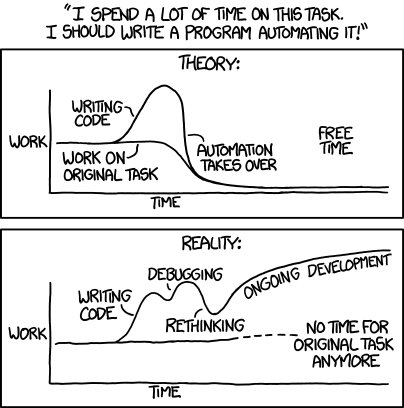
With the ease of which we can generate code (and verify its correctness/utility), I was on a quest to reduce as much friction as I can from my workflow. Every step that felt unncessary started becoming a papercut that I wanted to address via a hook/skill/chron job/custom software/etc.

It’s a slippery slope ofc where one ends up refining their tooling stack rather than just getting things done. My justification these days is that things are moving so fast in the whole LLM-agentic space that any attempt at trying stuff is my own way of eval-ing what can be pulled out of the latent space using current frontier technologies (that keep changing every few weeks).
Solution: Autorename + Upload to S3 + Copy Link to Clipboard
I changed the default screenshot folder to be ~/Pictures/Screenshots instead of ~/Desktop and built a small ambient service that watches the folder and whenever an image appears (generally when a screenshot is taken), it:
- Renames the screenshot to a more descriptive name using Apple’s Foundational Models (local on-device inference)
- Uploads the screenshot to an S3 bucket
- Generates a short-lived link to the screenshot
- Copy the link to the system clipboard
- Traces the entire pipeline in Langfuse for debugging and improvement
so that I could just Cmd+V the link in the remote coding session and have the image available in the session.
Showing the autorename + generation of S3 URL + Sharing the link with Codex
Source Code and Architecture
graph LR
    A[Screenshot taken] --> B[Watch folder detects]
    B --> C[Apple FM renames]
    C --> D[Upload to S3]
    D --> E[Copy link to clipboard]
The source code is available here. To use it (on a MacOS machine with Apple Foundational Models installed), I would just give the url to your favourite coding agent and ask it to setup things for you. I did my best to cleanup the README.md and AGENTS.md to make it easy to use. There might still be some hallucinations ofcourse.
I have not looked at the code yet and don’t intend to unless circumstances compel me to. It might very be slop indeed, and it doesn’t matter to me as long as it gets the job done.
My natural language specification to Codex, the use and evaluation of the software, and relevant iteration, and this blog post is the value I bring to the table (or at least aspire to).
For the purposes of this pet project, code is a lower level abstraction that deserves attention only during highly exceptional circumstance (like python -> C).
Design Choices, Iteration, Rumination
Short-lived links
Having a short-lived link that I can provide to the coding session felt ideal as it meant that I wouldn’t need to switch to any other windows/apps beyond taking the initial screnshot.
The dream was to take screenshot using MacOS’ standard screenshot tools -> Get short-lived link copied to the system clipboard automatically -> Paste the link in whatever remote coding agent session by just Cmd+Ving the link.
Namesake
We all have tons of screenshots named like Screenshot 2026-03-03 at 12.34.56.png in our ~/Desktop folder (or equivalent default screenshot folder). Ever since LLMs a became a thing, this was one of the low hanging fruits.
I have realized that often you want to refer to screenshots later (often days/weeks later) and not having a good name is another papercut to solve for irrespective of its use with a coding agent.
OCR, LLMs, and SLMs
While we could use LLMs with vision to get a suitable semantic description, screenshots are frequent enough (and sensitive enough) to avoid relying on calling an LLM API for every screenshot.
Apple Foundation Models felt like the perfect fit (if they were upto the job) in terms of both long-term cost and privacy.
Thankfully, the availability of text from the OS/vision recognition (TODO: find out exactly how we are getting text) made this the perfect usecase from getting the name slug from the available data.
Codex to work
As I knew what I wanted, it was pretty easy to get Codex
- to configure relevant s3 bucket + persmissions using
awsCLI - build a v1 that watched the screenshots folder and took care of
- renaming the screenshot to a more descriptive name
- uploading the screenshot to the s3 bucket
- providing a short-lived link to the screenshot
Essentially one shotting it with some niggles to fix.
Tracing and Improvements
I made Codex add langfuse tracing to the workflow to easily debug when things looked wonky (and also to make it easy for myself to understand the exact pipeline of inputs/outputs at each step). I was not sure what the exact inputs going into the Foundational Model inference were, what was the OCR fallback doing etc.
As I used it over the course of a couple of weeks, I made more changes like adding a GUI menu element to have a widget at the top to be able to
- browse the recent screenshots
- copy link again to the clipboard
- make image public and copy link if needed (in case I wanted to share it beyond using in a coding session etc.)
- copy image to clipboard
All of this was via simple conversations with Codex ofc. I never looked at the code.
Freeform Generation, Iteration, and Evals
In spite of my best efforts to make Codex read the docs, it chose to use freeform generation and parsing, which led to some bad results.
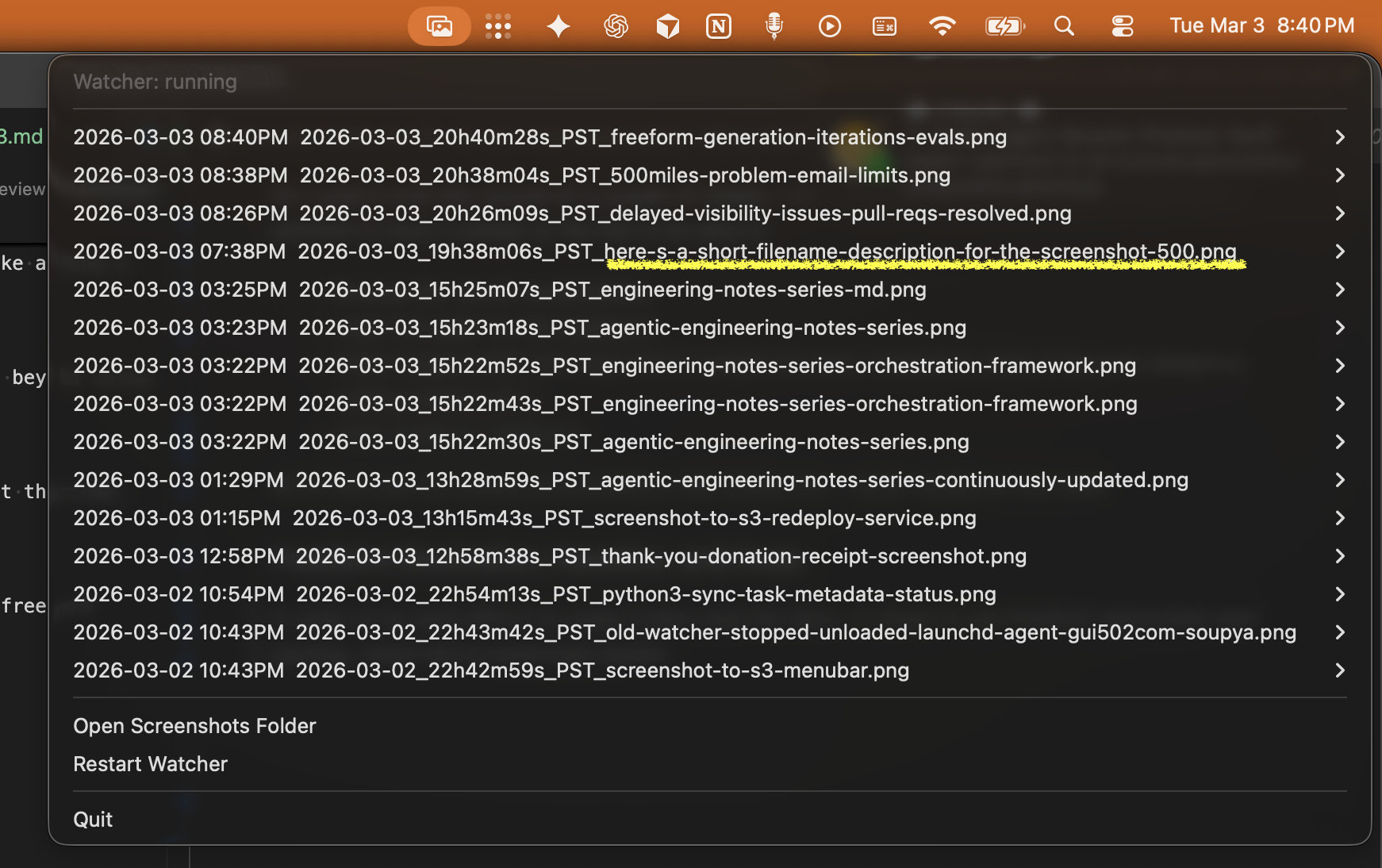
Bad file name highlighted in the menu
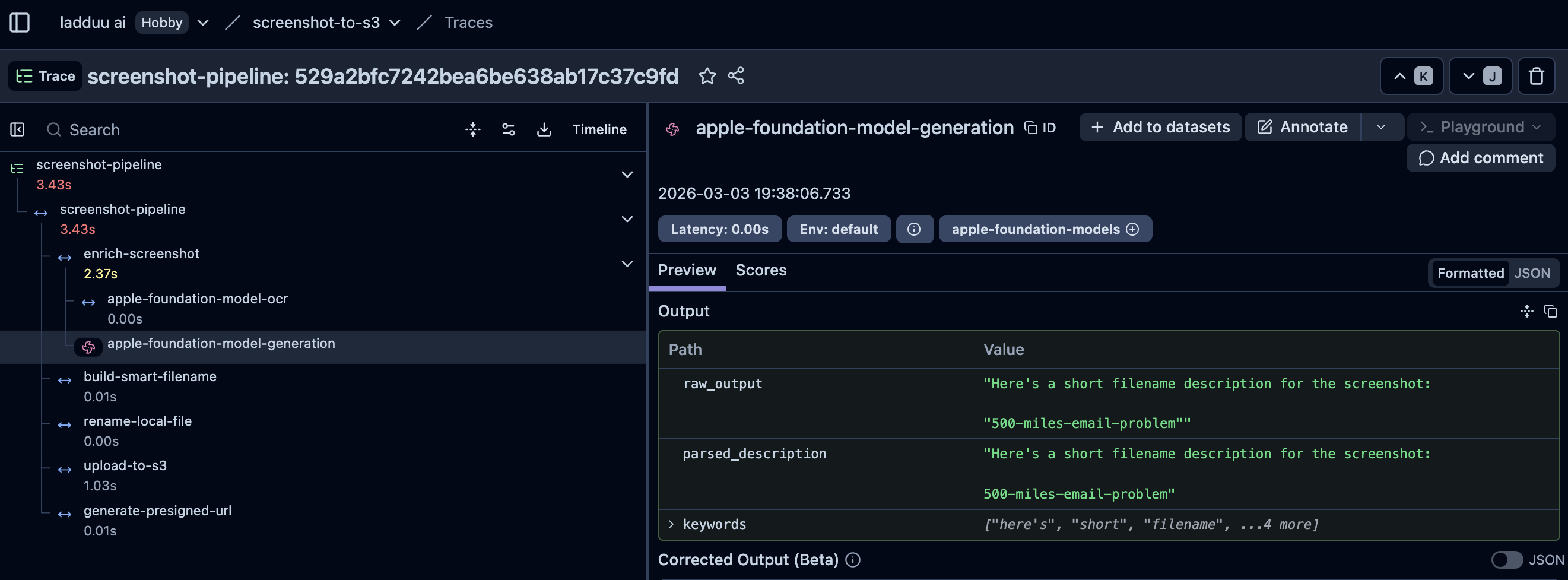
Langfuse trace showing the output parsing issue
Structured Generation
I just provided the langfuse trace ID to Codex and asked it to lookup the structured output feature from Apple’s documentation and use it to get a more reliable output.
That seemed to have worked well.
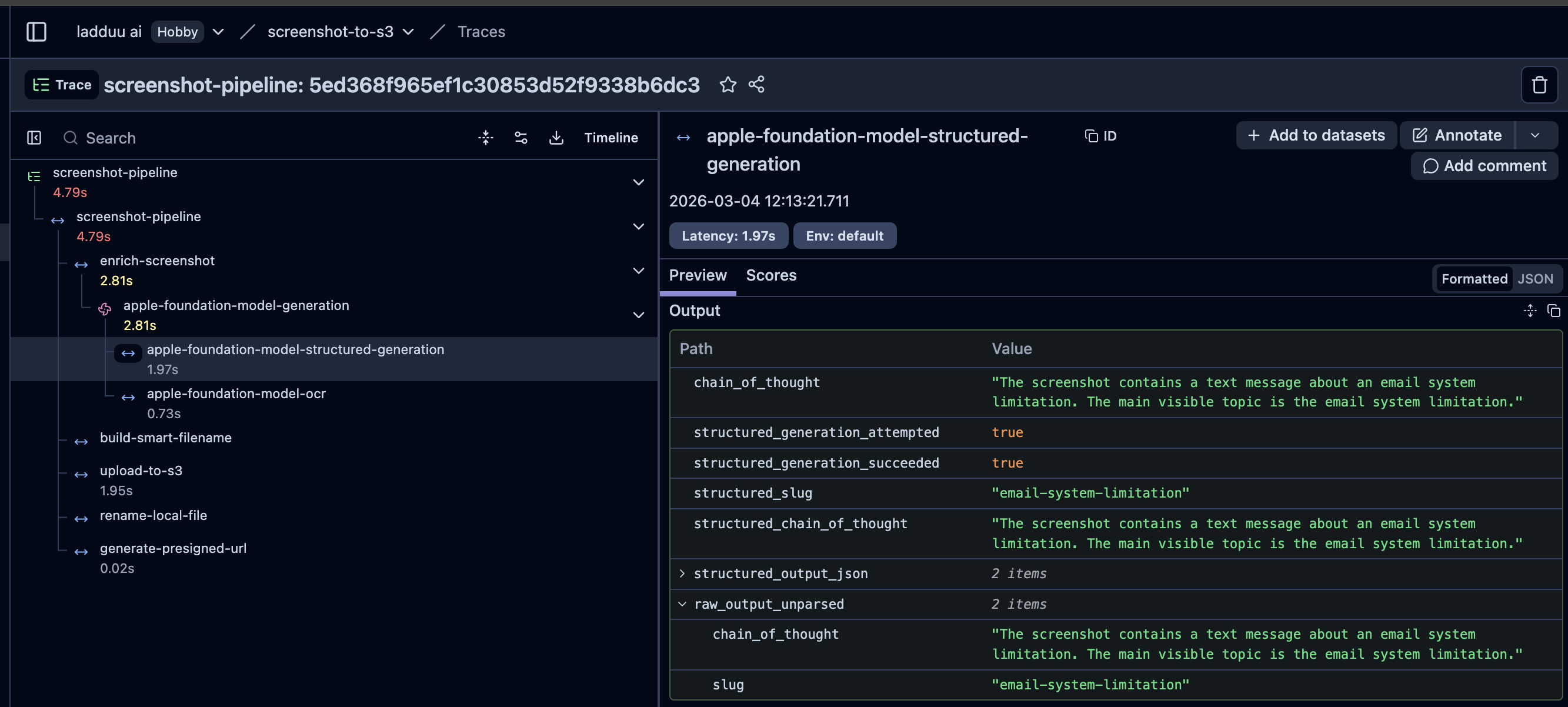
Langfuse trace showing the structured output
Latency
| Step | Time (seconds) |
|---|---|
| Vision Text Recognition | 0.52s |
| Structured Generation | 2.88s |
| Upload to S3 | 1.41 |
| Generate Presigned URL | 0.01s |
| Total | 4.82s |
For now, I am just living with the ~4.82s latency because I don’t need to worry about API costs/management and it’s wild that my local machine (which is relatively on the lower end of Macbook Pro out there with meagre 16GB of Unified Memory) can run actual usable LLM-like inference!! Will milk that feeling for a while and see how long that’s enough for me to live with the latency.
Learnings
- Apple Foundational Models are a great fit for tiny semantic transformations. The generation of relevant file name was a perfect usecase. Wonder when they will be start doing this natively in the OS itself.
- If focus was just about letting the remote agent sessions have access to the local screenshots, I could have easily get it done by configuring suitable SSH access and custom AGENTS.md instruction to
scpthe screenshot from local machine to the VM. - Since this was an off the cuff project, I didn’t give a detailed spec for Codex or monitored its plan too aggressively. This obviously let to some bugs/misalignment that I had to catch through use and fix over iterations. Even some things were explicitly spelt out (like research the documentation and implement), where an above average software engineer might have made better choices (like picking structured generation which a chain of thought field for evoking better reasoning). While the power of agentic coding, autonomous software has clearly gone through milestones over last few months (Nov 2025-Mar 2026), these things still need to be watched like a hawk. The jaggedness of their performance can be supremely frustrating. We need better systems to handle this so that we can leverage their strengths and optimize our cognition to handle the jagged blindspots better.
- Personal Software: This is most likely not the best solution (that already exists) for the overall problem. But for my little quirks, it seems to be worth maintaining and adapting so far.
- One thing I have realized over last 1 year, as model’s reasoning power and the overall harness, tooling ecosystem’s performance increases, it’s not like we automatically go from x% of things being coded correctly -> x+N% of things being coded correctly. Whenever we touch that extra magic, our ambition of what needs to be solved with what effort increases, making us go for harder problems with the same or less effort, making us find the edge of the new frontier again.